Building a cloud platform that can understand the AWS API is one thing; rigorously testing it is something else.
The AWS API is open, well documented and can be tested against for conformance fairly easily. Provisioned resource behaviour is also documented to an extent, and can be observed directly in AWS itself by spinning up resources. Internal AWS logic is closed, but as long as we understand requests and can return the correct responses, plus exhibit expected behaviour and resource lifecycle to the user - the tools should work and the experience should be similar.
Spinifex internal logic can and does differ from AWS. We aren't making a clone of AWS; we aim to improve the cloud experience for users - particularly at the edge and resource-constrained environments, while offering a familiar interface via the well-known and loved(?) AWS CLI and IaC tools like Terraform.
Unit, integration and end-to-end tests are all necessary in the pipeline to make sure we are building to the AWS spec. Weird edge-case bugs still pop up during manual deployment and fiddling, so we add in specific stress and fault injection testing to monitor any future regressions.
If there is one thing that unearths all of the dormant and hidden gremlins in your system - it is real-world testing. Unfortunately in the early days of an infrastructure project like this, we become stuck in a place where we would love to get our hands on some real production-grade AWS workloads, but the people that have said workloads want to see more evidence that the system functions (with someone else's workloads). Classic chicken and egg.
What do we do? To get good reference data, we need workloads and to get workloads, we need good reference data! Short of building our own SaaS product so we can "dogfood"1 Spinifex, we have been limited to a few basic Terraform examples we have created that make use of the official AWS provider, and self-hosting some internal tooling. Not a bad start, but quite tame and not the chaos that I know a real workload could create...
So I asked a good friend if I could try and get his homelab running on Spinifex. Now Jellyfin and Home Assistant are not exactly "production" or "enterprise", but it's a step in the right direction and serves the purpose of loading the system in ways we may not have anticipated - (un)hopefully surfacing enough things to keep us busy.
The workload
A GitOps homelab repository running bare-metal Talos Linux and Flux, reconciling state from git.
The original homelab belongs to my friend Ryan, who runs it permanently at home, serving 80+ services across 16 namespaces... so I shortened that to a more modest eight apps for our initial testing purposes. The template it grew from is onedr0p's cluster-template.
I also wanted to run this on its own on commodity hardware so I acquired some decommissioned Dell 7090 micro PCs and built a little Mulga themed mini rack:
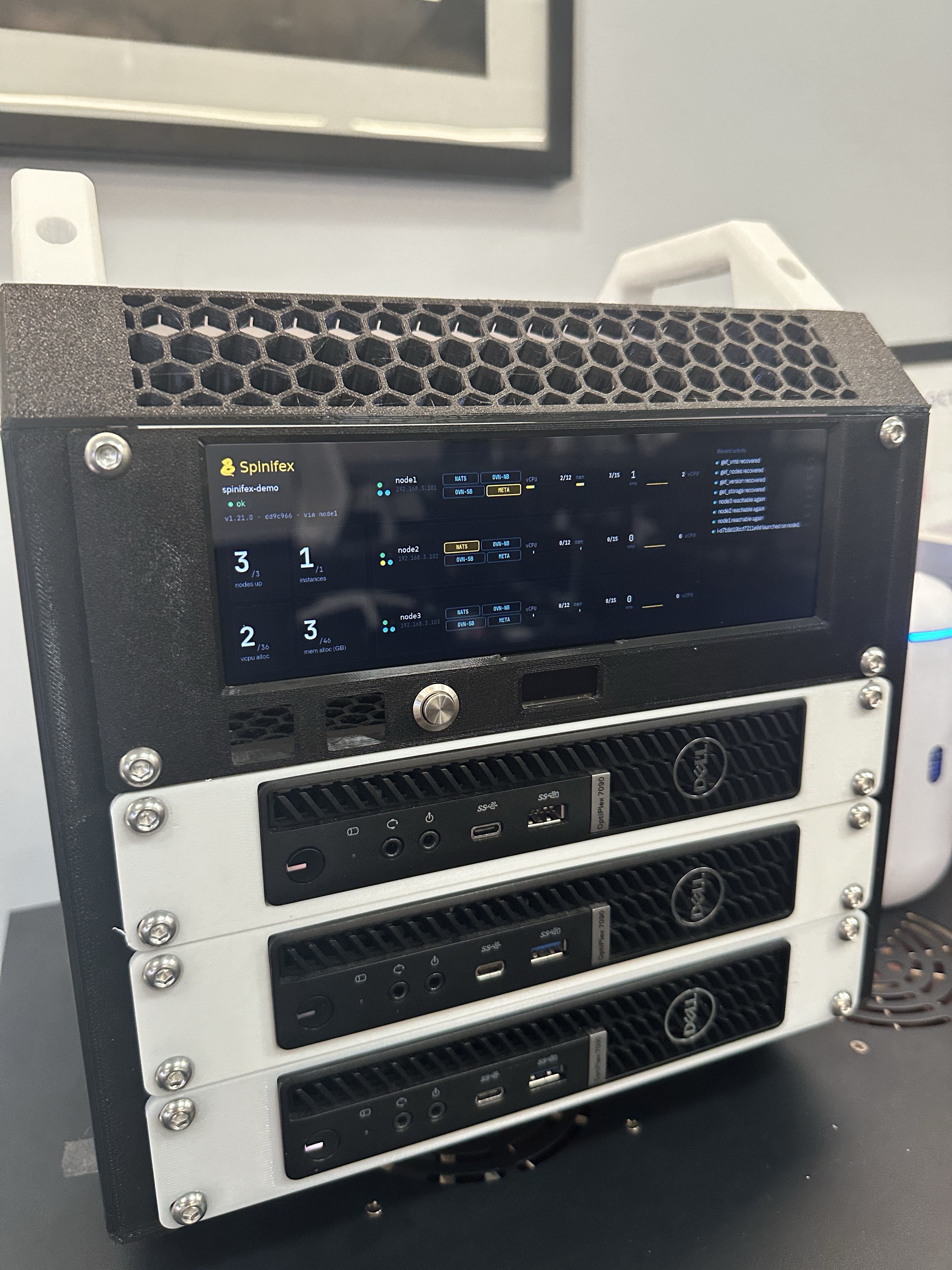
Each host has an i5 CPU (6C/12T) and 16GB RAM - not much to play with, but enough for now.
This workload is Kubernetes based, running on Talos bare-metal hosts. Porting this to test/showcase Spinifex features left me with a couple of options:
- Convert everything to managed services including EKS in place of Talos itself.
- Run Talos EC2 instances and pull some internal services out to replace with Spinifex managed services.
I went with option 2 - for now.
Replacing Talos and that entire workflow wholesale wouldn't have been in the spirit of porting the homelab across. It would essentially have been a complete rebuild and we would have only really taken some of the app choices as inspiration. More importantly - it would likely have introduced too much chaos at once and made it difficult to determine the root cause of any issues that arise.
So from here, I set out to move the homelab onto Spinifex, our AWS-compatible cloud for bare metal.
The headline is a deletion
Six operators left the cluster entirely.
| Service | In the original lab | On Spinifex |
|---|---|---|
| block storage | rook-ceph and ceph-csi-drivers |
Viperblock (EBS) |
| hostpath volumes | openebs |
Viperblock (EBS) |
| S3 | garage |
Predastore |
| Postgres | cloudnative-pg |
Spinifex RDS |
| Secrets | external-secrets |
sops (from the template; no platform service needed)
|
This seemed like a good enough cut to test our core Spinifex infrastructure, while leaving the applications inside K8s.
The capability of the homelab stays the same, but there is now a clearer boundary between infrastructure and user-facing applications.
So where does the infrastructure live now?
I know that the original Talos bare-metal homelab is actually more appealing to many hobbyists and homelabbers - configuring, tinkering and managing every part of the system is all part of the journey and fun of the game.
Yes, Flux now only reconciles application changes, but the infrastructure we pulled out still needs to be configured and provisioned somewhere - now via OpenTofu with the AWS provider:
- a VPC, subnet, internet gateway and route table
- 3 x instances (EC2) running Talos from the Talos Image Factory's AWS image, spread one per physical host by a placement group, plus an Elastic IP for the API
- 4 x security groups - nodes, edge, database, NFS - referencing each other rather than hard-coded ranges
- 1 x load balancer (ALB), its listeners and target group
- 1 x wildcard certificate from the tenant CA
- 1 x RDS instance, its subnet group and its generated password
- 1 x instance (EC2) serving NFS (and SMB), a separate EBS volume for the library, and the attachment joining them
- 1 x S3 bucket for backups, with an IAM user scoped to it
- the IAM role and instance profile the nodes assume
Thirty-three resources in all.
It's still declarative and still in version control. What changed is where it sits.
We cut the app count on purpose
Many of the apps in the original homelab were similar in nature so porting all of them really only meant longer build times and more load on the system. For a first test I wanted it to be reasonably quick to build and tear down, and I didn't want to overwhelm my poor little 7090s straight up.
I chose a select few apps that would demonstrate/test different Spinifex components, without too much overlap:
| Application | In the original lab | On Spinifex |
|---|---|---|
echo |
Cilium LoadBalancer IP, cert-manager via Cloudflare | Shared listener behind an ELB, ACM certificate from the tenant CA |
vikunja |
a ceph-block claim |
an ebs-gp3 claim, snapshotted and backed up to Predastore |
atuin |
CloudNativePG, running in the cluster | RDS, which the cluster doesn't run |
jellyfin |
a NAS over NFS, and an Intel iGPU | an EC2 instance serving NFS from an EBS volume |
dragonfly |
StatefulSet on ceph-block |
StatefulSet volumeClaimTemplate on ebs-gp3 |
kopia |
backup UI over garage |
the same UI, over Predastore |
kube-prometheus-stack |
claims on ceph-block |
claims on ebs-gp3 |
homepage |
dashboard over the whole lab | the same, over these seven |
Three control-plane nodes at 8 GiB each, no separate workers, running the whole workload. Twenty HelmReleases, thirty-three Kustomizations.
Nothing had to be told it wasn't AWS
This is what we want to see - Spinifex indistinguishable from real AWS from OpenTofu's perspective.
Every tool in the chain is the stock one:
-
The CSI driver is
aws-ebs-csi-driver, the upstream chart, unmodified. -
The infrastructure is OpenTofu with the
awsprovider, the same one used to deploy to AWS. - The nodes boot Talos' own AWS platform image, reading their configuration out of instance metadata exactly as they would in a real AWS region.
- Certificates come from ACM, routing from an ELB with isolation from security groups referencing other security groups.
None of it is Spinifex-aware. There is no plugin, no fork, no patched chart. The only thing any of those components needed was an endpoint to point at, and a CA bundle to trust it with - which is configuration, not code.
Now to be fair - I have not actually changed the endpoints in OpenTofu and deployed to a real AWS region - that was not within the initial scope of this experiment, but it could be a nice follow-on activity.
Where the API did differ
Matching exact AWS capability isn't simple. It's thousands of small behaviours, nuanced by the particular combination of resources in a workload and the timing of when actions are occurring. Some are not consistent across similar resources and others are not at all what you would intuitively expect to happen. All of the things we hadn't planned for show up in experiments like this - such as:
| What happened | What AWS does | Why it mattered |
|---|---|---|
An IAM user's access key went missing underneath it.
ListAccessKeys showed none, but DeleteUser
still refused with DeleteConflict
|
The two calls always agree |
tofu destroy couldn't remove the user, and a rebuild
couldn't add a new key either: the two-key limit counted the ones
nobody could see
|
A launch with no host able to take it came back as a generic
500
|
InsufficientInstanceCapacity, a client error |
The AWS SDK retries 500s, so OpenTofu sat waiting out its timeout instead of failing in seconds |
DeleteSnapshot refused with "in use by one or more
AMIs" when a volume was the dependency
|
Names what is actually holding it | Correct error code, misleading message: it sent us looking for images that didn't exist |
describe-volumes with a snapshot-id
filter returned every volume
|
Applies the filter | Any script narrowing by snapshot would have acted on the wrong volumes |
None of these would show up in a test that checks one handler at a time. Error codes, retry semantics and consistency between calls are part of the contract as much as the response shapes are, and every one of these is now tracked with a reproduction. Finding this kind of gap is the reason to run something real.
The NAS becomes an instance
An interesting divergence between the original homelab and my Spinifex
remix was that I did not have a separate NAS appliance for
jellyfin to use.
The workaround was to stand up a separate vanilla Ubuntu EC2 instance
outside of the Talos cluster, with a 20 GiB encrypted gp3
volume that only the cluster node group could talk to via port 2049
(NFS).
This volume is a separate resource from the instance's root disk so it does not live and die with the instance it is attached to. It can also be snapshotted and reattached on fresh builds.
I initially had cloud-init install ffmpeg and generate a 30
second test pattern, so the demo depends on nothing being copied in by
hand.
From inside the pod:
Filesystem              Size  Used Avail Use% Mounted on
172.31.0.30:/srv/media   20G  2.8M   19G   1% /media

/media/movies/Test Pattern (2026)/Test Pattern (2026).mp4
The application's mount is the one thing that didn't change - same
type: nfs, same readOnly, different server.
Moving the NAS inside Spinifex did mean adding a way to transfer media to it. I ended up configuring an SMB share on the instance including user credentials and allowing ingress through the VPC Security Group - all provisioned via IaC.
One thing is untested. The original homelab passes an Intel iGPU through
for Quick Sync transcoding. The hosts this lab runs on have no GPU to
give it, so transcoding is on the CPU and both the
gpu.intel.com/i915 resource and the render group are gone
from the manifest.
Spinifex does support GPU pass-through to EC2 instances (and ECS on them), so a discrete GPU would be possible, just not on this hardware. An iGPU shared the way the original lab uses Quick Sync is a different question, and one for that follow-up.
Then we tried to break it
Bootstrap and deployment issues aside, it was time to test some operational resilience and see where the wheels fall off. Just a couple of things to start, but will likely build on this:
Deleting the volume for real
Most backup tests restore alongside the original. This one destroyed the original first.
We created a user, a project and three tasks through vikunja's own API - records the application wrote itself, not files we placed on a disk - and backed them up to Predastore. Then we deleted the claim.
The PersistentVolume went with it, and describe-volumes on
the underlying EBS volume answered InvalidVolume.NotFound.
At that point the only copy of that data in existence was in an object
store on other machines.
Flux recreated the claim, the populator restored it onto a different volume, and all three tasks came back with the user still able to log in.
A hiccup with
WaitForFirstConsumer: a restore will not start if nothing is asking for the volume. The claim satPendingfor five minutes with one event -waiting for first consumer to be created before binding- because the workload had been scaled to zero to release the old claim and nothing had scaled it back.
Killing a node
stop-instances --force on the node running vikunja, atuin, kopia and a dragonfly
replica. Not a drain, not a graceful shutdown - the power-loss case.
etcd kept quorum on two of three throughout. The Kubernetes API never became unavailable. Every other application stayed up.
The detail that matters is the volume. vikunja's claim was
attached to the node that died - the CSI driver detached it, reattached
it on a survivor, and the pod came up against the same data. The seeded
tasks were still there. The storage followed the workload,
which is the entire reason for keeping it off the node in the first
place.
The neighbour that didn't notice
A side bonus I didn't plan for: the whole time, the same Spinifex cluster was also serving one of our internal dashboards inside a container on ECS.
Across every build, teardown and half-failed rebuild of the homelab, it
kept serving, with the exception of when its host had to be hard reset
after the e1000e NIC hang (more on that below), but it
recovered by itself each time.
A bonus of multi-tenancy I guess - the homelab could make a mess of its own account without the platform's other tenants feeling it!
Building it from nothing
The whole thing is in a public repository, linked at the end, with a README that goes step by step. This is the shorter version: the shape of a build from bare metal to running apps, and the one thing at each step that caught me out.
1. Install Spinifex
A multi-node install from the public docs, across the three 7090s. On top of a plain install the lab needs three things from the platform:
- addresses on the LAN it can hand out for Elastic IPs and the load balancer,
- a tenant CA for the domain, so ACM can issue the wildcard certificate, and
- the base images for the NFS server and the database.
Gotcha: distributing the tenant CA
Every private CA has two distribution problems: the signing key has to reach everything that issues certificates, and the root certificate has to reach everything that should trust them.
Spinifex does not currently have an easy way to create then distribute a private CA to all nodes.
spx admin cert create-tenant-ca writes the key pair to
/etc/spinifex/ on the node you ran it on, and each node's
daemon loads it from its own disk. Whichever node answers an ACM request
needs the key, so certificate requests fail depending on where they
land, with a no tenant CA is configured error.
The fix is to create it once and copy the pair to every node, keeping the private key readable only by root:
# on each of the other nodes, after copying both files over ssh
sudo chown root:root /etc/spinifex/tenant-ca.{pem,key}
sudo chmod 0644 /etc/spinifex/tenant-ca.pem
sudo chmod 0600 /etc/spinifex/tenant-ca.key
Don't run create-tenant-ca on each node - you'd get three
different CAs. The client side is the usual internal-PKI chore: add
tenant-ca.pem to the trust store of every machine that
browses the lab. Replicating the CA through the platform, rather than by
hand, is on our list.
Gotcha: the e1000e NIC hang
This one has nothing to do with Spinifex, and it can bite anyone running
virtual machines on hardware with an onboard Intel e1000e
NIC. One of the 7090s kept vanishing from the network mid-build, badly
enough to need a hard reset. The kernel log had the answer:
e1000e 0000:00:1f.6 enp0s31f6: Detected Hardware Unit HangThe NIC's transmit queue hangs under heavy traffic when TCP segmentation offload is on, and tunnelled VM traffic was the trigger here. Turning the offloads off fixes it, at the cost of a little CPU on very high throughput:
ethtool -i enp0s31f6 | head -1          # driver: e1000e?
sudo ethtool -K enp0s31f6 tso off gso off gro off
That only lasts until reboot, so persist it with a small systemd unit:
# /etc/systemd/system/e1000e-offload.service
[Unit]
Description=Disable offloads that hang the e1000e NIC under load
After=network-pre.target
Before=network.target

[Service]
Type=oneshot
ExecStart=/usr/sbin/ethtool -K enp0s31f6 tso off gso off gro off
RemainAfterExit=yes

[Install]
WantedBy=multi-user.target
For a distributed system, a locked-up network interface is not great. This caused mild frustration and more than a couple of fresh cluster builds before it was identified, but it actually highlights work required in the way Spinifex manages state and recovery if a node vanishes mid-write.
2. Fork it and describe your cluster
Everything specific to your cluster goes in one file, cluster.toml: the domain, the gateway and object-store endpoints, how many
controllers, the Git repository Flux should watch. Then:
just init           # age key for secrets, a deploy key for Flux, a webhook token
just configure      # renders the tofu variables and the Talos machine config
./scripts/preflight.sh
Preflight imports (or gives you instructions to import) the Talos image for your machine config, checks your credentials against the gateway, and checks Flux will be able to read your repository with exactly the access it will have.
3. Build the environment
just bootstrap talos     # the machine configs the nodes boot from
cd tofu && tofu apply
That's the thirty-three resources from earlier. The environment creates
its own VPC from the node range in cluster.toml, and owns
it.
4. Bring the cluster up
By default the bootstrap reaches the Kubernetes API by name, so the
names have to resolve first. I used a spare domain that I had and set
DNS pointing at the private addresses the build hands out (just hosts --print lists them). The repo can also write them into /etc/hosts
if you'd rather not.
just bootstrap cluster kubernetes.<your domain>
./scripts/render-secrets.sh && git add -A kubernetes && git commit -m 'chore: my cluster' && git push
just bootstrap apps
From there Flux does the rest, in order. The first time every app deployed at once, the burst of image pulls slowed etcd down enough to destabilise the control plane, so the repo now declares what each app depends on and Flux works through them two at a time:
5. Use it
just secretsprints every login in one place.- Media goes onto the share from the desktop over SMB.
- Each device that browses the lab also has to trust the tenant CA once (or you click to accept the warnings).
6. Tear it down in the right order
Kubernetes creates EBS volumes and snapshots of its own, outside OpenTofu, and deletes them along with their claims, but only while the cluster is still running. So:
- Delete the workloads and claims
- Wait for the volumes to go
- Empty the backup bucket
tofu destroy
Do it the other way round and every volume the cluster made is left behind.
What we got out of it
It would be easy to end this with "and now the homelab is easier to run"... but it isn't, really. Ceph, the Postgres operator and the object store moved out of the cluster, but their replacements don't magically take care of themselves in Spinifex. It's a homelab, so from bare metal to app is still on you to maintain.
Mulga ships the platform releases and the system images, so there are no packages to manage per instance, but it's still your infrastructure.
The real payoff was the one this started with: a workload we didn't write, poking holes in all of our E2E test suites. The bugs it surfaced aren't unexpected or wild edge cases, but would have likely taken considerably more thought and building of test scenarios up front to discover in a test harness directly:
- a hardware fault on one host cascading into platform state on the others
- state that only goes wrong between components after an unclean restart
- load nobody writes a test for, like every chart deploying at once
- API calls that are each correct alone and contradict each other together
Every one of them is now tracked, and the ones that can be reproduced are becoming regression and fault-injection tests.
The homelab repository picked up its share too, and will hopefully save the next person from hitting the same walls:
- checks that fail early instead of late
- a bring-up order
- a teardown order
The side effect is a different way to run a homelab.
The cluster is disposable - storage, the database and backups live in the platform underneath it, and the whole thing is built with the same AWS tooling people already use, on hardware they own.
It's not easier than the original. It's another option, and it's yours to fork.
What's next: a host with a GPU to try transcoding, deploying the same OpenTofu to a real AWS region to compare, and handing the lab's DNS to the platform instead of editing records after every rebuild.